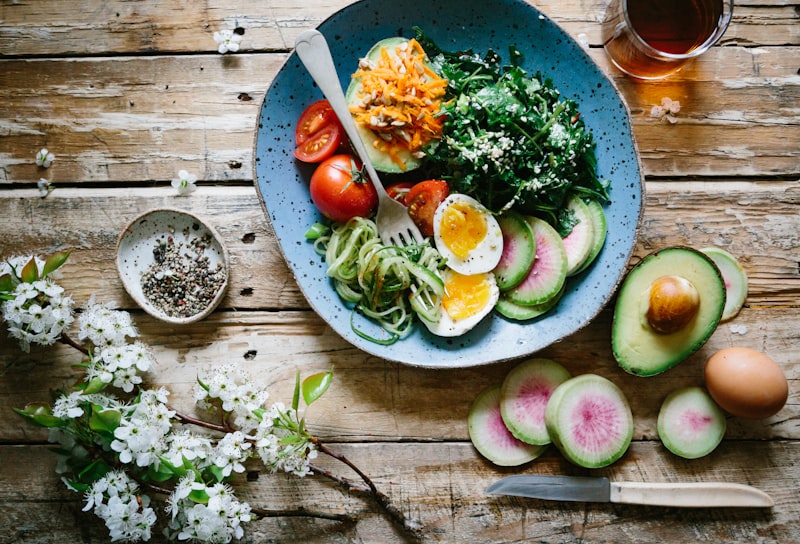
Manual calorie tracking is where good intentions go to die. You finish a meal, open an app, search "grilled chicken," scroll past forty near-identical entries, guess the grams, do it again for the rice, again for the vegetables — and by the third day you quietly stop. The friction, not the willpower, is what breaks the habit.
That's the problem AI calorie counting from a photo is built to solve. Instead of typing, you point your camera at the plate and let AI do the identifying, portioning, and math. In RecipeScan, that's the Calories mode in the Scan tab: snap a photo and get an estimate of calories, protein, carbs, and fat in a few seconds. Here's how the technology works, how to get the most accurate result, where it falls short, and why doing it inside an app that also holds your recipes and meal plan changes the game.
How AI Photo Calorie Estimation Works
Counting calories from a picture is really three jobs happening at once, in under the time it takes to put your fork down:
- Food recognition. A vision AI model looks at the plate and identifies what's on it — the protein, the starch, the vegetables, the sauce, the garnish. It's the same class of model that powers our Pantry Scan and Meal Scan, tuned for food.
- Portion estimation. This is the hard part. The AI reads visual cues — how the food fills the plate, its height and density, and the size of familiar objects nearby — to estimate how much of each food is present, not just what it is.
- Nutrition lookup. Each identified food and its estimated portion is matched to nutrition data, then everything is summed into a total for calories and the three macros.
The result is a fast, well-reasoned estimate. It is genuinely useful — but it's an estimate, and being honest about that is the whole point of the next section.
How Accurate Is Photo Calorie Counting? (An Honest Answer)
Here's the truth every calorie app should tell you: no method of tracking calories is exact — not photos, not barcodes, not even weighing every gram. Published calorie counts on packaged food labels are allowed a margin of error, restaurant portions vary wildly, and your body doesn't absorb every listed calorie anyway. The goal of tracking isn't a perfect number; it's a consistent, directional number you can act on.
Photo calorie counting fits that goal well. It's most accurate when:
- Foods are clearly visible and separated on the plate rather than mixed into one dish.
- The photo is well lit and shows the whole portion.
- There's a sense of scale — a plate, a fork, or your hand in frame.
It's least accurate for the things you can't see: the oil a dish was fried in, the butter stirred into a sauce, the sugar dissolved in a drink, or the second helping that never made it into the photo. A creamy curry and a broth-based one can look similar and differ by hundreds of calories. So treat the estimate as a smart starting point — close enough to keep you honest, and adjustable when you know better.
How to Log a Meal by Photo, Step by Step
- Open the Scan tab — the camera button in the middle of RecipeScan's tab bar.
- Tap the "Calories" chip at the top. (The other chips scan a single ingredient, a whole pantry shelf, a barcode, or a plated meal to get its recipe.)
- Photograph your plate. Straight-on or top-down, in decent light. Or tap Photos and pick a shot you already took.
- Confirm and log. The estimate appears — calories plus protein, carbs, and fat. Nudge the portion up or down if it looks off, then log it to your day with one tap.
Six Ways to Get a More Accurate Estimate
1. Get the whole plate in frame
The AI can only count what it can see. Capture the full portion before you start eating — a half-finished plate estimates a half meal.
2. Include something for scale
A standard dinner plate, a fork, or your hand at the edge of the frame gives the AI a reliable size reference, which sharpens the portion estimate more than any other single trick.
3. Shoot in good light, at a slight angle
Bright, even light beats dim restaurant mood lighting. A 45° angle often reads height and volume better than a flat top-down shot, especially for piled or stacked foods.
4. Separate mixed dishes when you can
A one-pot stew or a fully mixed bowl hides its components. When it's easy, photograph foods before they're combined, or nudge the identified items after the scan. If you cooked it yourself, skip the photo: log the recipe itself, which uses the real ingredient amounts.
5. Adjust the portion — you know your plate
If you know you had a bigger serving than the estimate assumed, bump it. Your corrections make the running total more truthful, and it takes one tap.
6. Don't forget the invisible calories
Cooking oil, dressings, and drinks are the usual blind spots. If a dish was pan-fried or a salad was dressed, add a little — it's the single biggest reason photo estimates run low.
More Than a Calorie Counter
Most calorie apps do one thing. You log a meal, see a number, close the app — and when you actually need to decide what to eat, you're on your own. RecipeScan closes that loop, because the same app that estimates calories from a photo is also a full cooking app:
- 1,300+ recipes — with nutrition info, so the food you cook is already easy to track.
- Photograph your fridge and get recipes from what you already have, complete with their calorie and macro breakdown.
- Meal planning with Premium auto-fills your week and shows weekly nutrition and cost insights, so you can plan around a calorie or protein goal instead of reacting after the fact.
- AI grocery lists turn your plan into a shopping list, grouped by aisle.
- iCloud backup keeps your logged meals, recipes, and plans safe and in sync across your iPhone and iPad.
That's the difference between counting calories and actually managing your eating: a single-purpose tracker tells you what you did, while an all-in-one app helps you decide what to do next — and then cook it.
Count calories from a photo
Download RecipeScan and snap your next meal. Calories, macros, recipes, and meal planning, all in one app.
Download on the App StoreFrequently Asked Questions
Can AI really count calories from a photo?
Yes — with an important caveat. AI vision models identify the foods on your plate, estimate portion sizes from visual cues, and match them to nutrition data to produce a calorie and macro estimate in seconds. It's a fast, well-informed estimate rather than a lab measurement, so treat the number as a reliable guide you can fine-tune, not an exact reading.
How accurate is photo calorie counting?
Accuracy is best for clearly visible, separated foods photographed in good light, and lower for mixed dishes, sauces, and hidden oils or butter. For most everyday meals a photo estimate lands close enough to keep you on track — and you can improve it by getting the whole plate in frame, including a reference object for scale, and adjusting the portion after the scan.
Is there a free AI calorie counter?
Logging calories by hand is free in RecipeScan. Photo calorie estimates (and barcode and AI text estimates) are part of RecipeScan Premium: $4.99/month or $29.99/year, with a 7-day free trial for eligible new subscribers.
Can I track calories and get recipes in one app?
Yes — that's what sets RecipeScan apart from single-purpose calorie apps. The same app that estimates calories from a photo also holds 1,300+ recipes, turns a photo of your fridge into meal ideas, plans your week, and builds a grocery list — so tracking and cooking live in one place.
Do I have to weigh my food to track calories?
No. Photo calorie counting is designed to skip the scale — you snap the plate and AI estimates the portion for you. If you want more precision for a specific food you can still adjust the portion or enter a weight, but for everyday tracking a photo is enough to stay consistent.
Are my meal photos stored anywhere?
No. Photos are analyzed in real time and immediately discarded. Your logged meals and daily totals live on your device and, with Premium, back up to your private iCloud so they restore on any device you sign in on.
RecipeScan's calorie and macro figures are AI-generated estimates for general informational purposes and are not medical or dietary advice. For precise nutritional needs, consult a qualified healthcare professional.